Previous
lesson
Previous
lesson
| Previous
lesson |
Next lesson |
The correction valueWith Spline markers you change the offset between picture and sound by means of a correction value which you enter into the input field of the marker settings. In this way you shift the sound (more exactly: the audio track) relatively to the picture by the specified amount:
With regard to the direction of the sound shift counts for all markers:
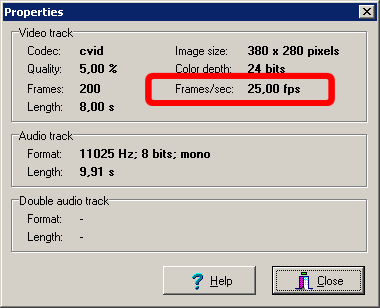
Frames and secondsThe correction value is measured in frames. Therefore it depends on the frame rate of the current video, to which time difference a given correction value corresponds. You find out the frame rate in the Properties dialog. Choose for this the menu option . The following window appears:
The information "Frames/sec" indicates how many video frames are played in every second. The video in our tutorial has a frame rate of 25 fps (frames per second), what corresponds to the television standard usual in Central Europe. This means, that if you specify e.g. a correction value of 50 in the above input field, you shift the sound thereby by 2 seconds. Have once again a look at the video in the preview. The sound comes undoubtedly too late - but how much too late? Which amount do you estimate for the time difference to the picture (in seconds)? |
| Adjustment of picture and sound |
| Previous
lesson |
Next lesson |